SolidCraft Plugins › 3D Printing Holes
3D Printing Holes v0.1.0
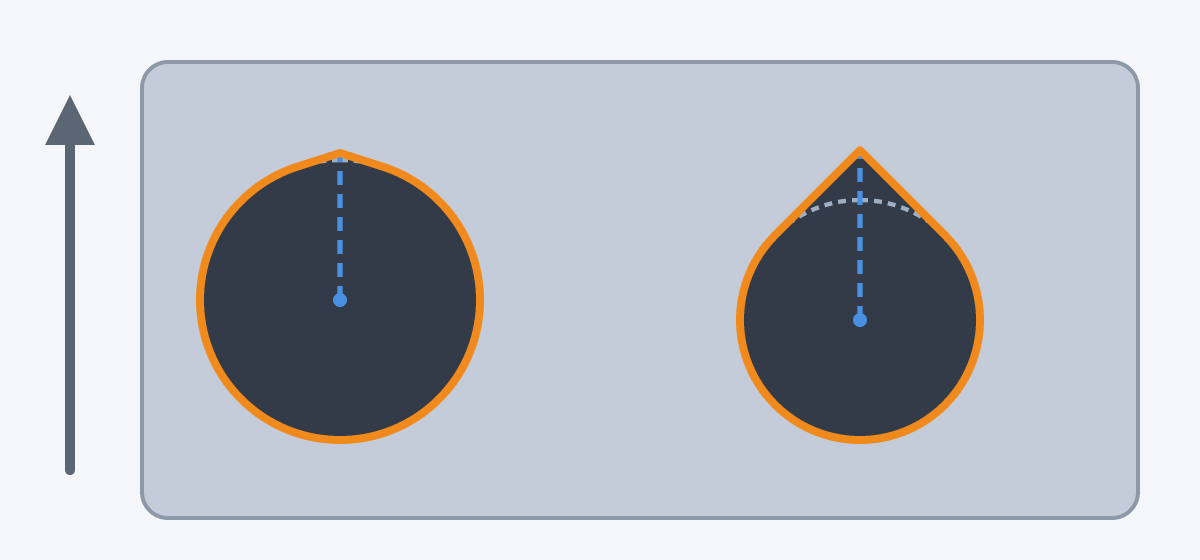
Holes made for 3D printing. Teardrop: select sketch circles, then run it; each gets a small tip a few percent of the radius above it (it follows the radius), so the top of a horizontal hole does not sag.
What it adds to SolidCraft
- Teardrop
Install 3D Printing Holes
- Download the zip above (from release v0.1.0).
- In SolidCraft: Plugins › Install plugin… and pick the zip.
- Run it from the Plugins menu, or its button in the ribbon (SolidCraft 0.42 and later).
Questions and bug reports go to the plugin's author, in the issues on GitHub.
More SolidCraft plugins
- AprilCube Generate printable cuboids and voxel targets with AprilTag or ArUco markers, edge…
- Filament Swatch Filament sample tiles: brand, material, colour and temperatures in text, and thin steps…
- Gridfinity Gridfinity bins and baseplates from a grid size: feet, stacking lip, magnet holes,…
- Gridfinity Builder Generate editable Gridfinity bins, compartments, stacking lips and drawer baseplates.
- Honeycomb & Hexagon Generator Fill up to 250 cells across selected sketch regions. End the active tool with Esc and…
- Isometric Manufacture Sheet Projects every body of the open design to a true isometric, removes hidden lines with a…